
Network Infrastructure and Enterprise Wi-Fi Installation: Switches, Access Points and Coverage Planning
A business network that plans wired and wireless together, separates users and devices onto the right networks and is measured before handover.
In short
Network infrastructure installation sets up the active network layer that connects a building's computers, phones, cameras and other devices to each other and to the internet through switches, wireless access points and network configuration. It suits offices, hotels, factories and schools. Sora Yazılım provides network and enterprise Wi-Fi installation in İzmir and its surroundings.
What is network and wireless infrastructure and what is it for?
Network infrastructure (the local area network, LAN) is the set of active devices, such as switches, wireless access points (APs) and gateways, together with their configuration, that let a building's devices talk to each other and to the internet; enterprise Wi-Fi is the wireless part of that network.
Computers, IP phones, cameras, printers and guest devices in the same building all share one network. A well-built network separates this traffic with VLANs, prioritises voice and video, and makes sure the wireless network delivers enough capacity in every part of the building.
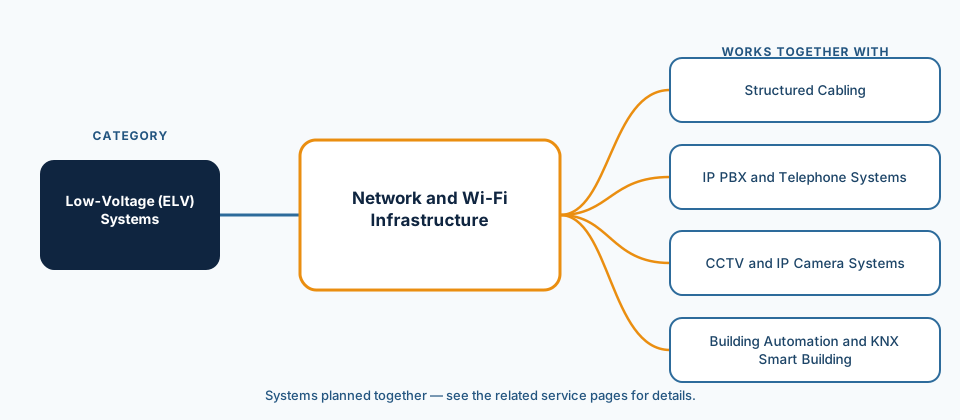
Network infrastructure sits on top of the passive cabling. The copper links from the cabinet to the outlet are covered on the structured cabling page, and the backbone between floors and buildings on the fibre optic cabling page; this page focuses on switches, access points, coverage planning and network configuration.
Which buildings and needs are network and enterprise Wi-Fi suited to?
Any building with several groups of users, networked devices and visitors benefits from a planned network rather than a single consumer-grade router.
- Offices and office towers: staff, guests, IP phones and printers managed on separate networks; heavy wireless use in meeting rooms.
- Hotels and accommodation: guest Wi-Fi in rooms, the lobby, restaurants and pool areas, kept separate from staff and management systems.
- Factories and warehouses: seamless roaming across the site for handheld terminals and forklifts, in demanding environmental conditions.
- Schools and education: many devices connecting at once in classrooms, with student and administrative networks kept apart.
- Shops, cafés and restaurants: guest internet separated from payment and till systems.
- Healthcare facilities: separate networks for medical devices, staff and patients' visitors.
What are the components of a network and the types of wireless network?
A business network has four basic layers: the gateway or firewall that manages the internet connection, the switches that connect devices to each other, the access points that provide wireless access, and the management layer from which all of them are run.
| Component | Role | Points to consider |
|---|---|---|
| Gateway / firewall | Internet connection, rules between networks, remote access | Number of users, number of internet lines and security needs |
| Core and distribution switch | Connects floor cabinets and servers to each other | Backbone link type (copper or fibre), redundancy and port capacity |
| Access switch (PoE) | Brings outlet-connected devices onto the network and powers phones, cameras and access points | Port count, total PoE power budget and room for growth |
| Wireless access point | Provides Wi-Fi connections to users | Indoor or outdoor, user density, supported Wi-Fi generation |
| Management (controller or cloud) | Configuring and monitoring all devices from one place | On-premises or cloud management, reporting and alerting needs |
On the wireless side, Wi-Fi 6 (IEEE 802.11ax) and later-generation access points are now widely used in business projects. The generation chosen depends on what users' devices support and how many devices connect in the same area. The main configuration elements of the network are:
- Network segmentation with VLANs: staff, guest, voice, camera and management traffic kept on separate virtual networks.
- Guest network: a separate wireless network isolated from the company network, with an optional captive portal and terms of use.
- Coverage and capacity plan: access point positions, channel and power settings, and layout based on capacity in busy areas.
- Roaming: users move from one access point to the next without dropping their connection.
- Quality of service (QoS): voice and video call traffic is given priority.
What does our network and enterprise Wi-Fi service scope include?
Our network service runs from needs analysis to post-installation validation; the detailed scope of each project is written into the proposal after the survey.
- Discovery and needs analysis: number of users and devices, applications in use, guest requirements, existing equipment.
- Wireless coverage plan: predictive design on the floor plan and, where needed, an on-site survey.
- Network design: VLAN and IP plan, guest network, access rules between networks.
- Equipment selection, bill of materials and procurement: switches, access points, gateway.
- Mounting, in-cabinet connections and device configuration.
- Post-installation wireless validation survey and performance tests.
- Handover of the network diagram, IP and VLAN plan and management access details, plus user training.
- Optional periodic maintenance, firmware updates and expansion work.
How does a network and Wi-Fi project run?
The process starts with a discovery call, continues with coverage and network design and ends with the network measured, documented and handed over; in an occupied building the changeover is planned so it does not disrupt work.
- Discovery call: we discuss users, devices, applications and the problems you are experiencing.
- Site visit: floor plans, cabinets, existing cabling and equipment are inspected; a wireless survey is carried out if needed.
- Design: access point layout, switch structure, VLAN and guest network plan are drawn up.
- Proposal: the equipment list, scope and changeover schedule are put in writing.
- Installation and configuration: devices are mounted and configured, and the move from the old network is carried out to plan.
- Validation: coverage, roaming and throughput are measured and weak areas are corrected.
- Handover: the network diagram, configuration backups and management details are delivered, with a short user training session.
Which factors affect the choice and the cost?
The cost of a network installation is driven mainly by user and device density, the area to be covered, the class of equipment chosen and the management model; an exact figure can only be given after the survey.
We do not publish price ranges: two buildings with the same floor area can need very different numbers of access points depending on wall construction and user density.
- Size of the area to be covered, number of floors and wall construction (concrete, glass, metal racking).
- Number of users and devices connecting at the same time; busy areas such as meeting rooms and lobbies.
- Need for indoor and outdoor access points.
- Number of PoE-powered devices and switch port capacity.
- Choice of on-premises or cloud management and the licensing model.
- Condition of the existing cabling; need for new links or cabinets.
Which standards and regulations apply?
Business networks are built on the IEEE Ethernet, VLAN and wireless LAN standards; for projects in Türkiye, businesses that offer internet access to guests must also consider the regulation on mass-use internet providers and personal data protection law.
Identifying users and keeping access logs on a guest network means processing personal data; for topics such as privacy notices and retention, see the resources of the Personal Data Protection Authority (KVKK), which oversees Türkiye's Personal Data Protection Law (KVKK). We recommend assessing which obligations apply to your business with your legal adviser; the technical setup is configured according to that assessment.
- IEEE 802.11ax-2021 — the high-efficiency wireless LAN amendment known as Wi-Fi 6; IEEE has incorporated it into the current base text, IEEE 802.11-2024.
- IEEE 802.1Q-2022 — Bridges and Bridged Networks; the standard on which VLANs are based.
- IEEE 802.3-2022 — the Ethernet standard, which also contains the provisions for powering devices over twisted-pair cable (PoE).
- For projects in Türkiye: the Regulation on Internet Mass-Use Providers (İnternet Toplu Kullanım Sağlayıcıları Hakkında Yönetmelik, Official Gazette 11.04.2017, No. 30035) — sets obligations such as content filtering, keeping access logs and identifying users for venues that offer internet access to guests or in public areas.
How does the network work with other systems?
Most low-voltage systems in a building are now IP-based and run over the same switches, so the network is designed with every system to be connected in mind, not just computers.
Desk IP phones are powered from PoE switches and voice traffic is prioritised on its own VLAN; the phone system side is covered on the IP PBX and telephone systems page. Because cameras generate a continuous video stream, they are usually kept on a separate network with bandwidth planned alongside the recorder: CCTV and IP camera systems. IP gateways for lighting and HVAC control also run on their own network segment: building automation and smart building systems.
Product and model details are on our catalogue pages: Ruijie / Reyee networking products, FortiAP access points and FortiSwitch switches. For operating the firewall at the internet edge, see our firewall maintenance and management service; for how the network relates to the building's other systems, see the low-voltage (ELV) systems page.
Which questions do we ask during discovery?
A sound network design depends less on the device count than on understanding who works where in the building and with which applications, so we work through the following questions together during discovery.
- How many staff and guests connect at the same time, and which areas and hours are busiest?
- Which uses are sensitive to interruptions: video calls, cloud applications, handheld terminals?
- Which devices will connect to the network: phones, cameras, printers, access control?
- Is a guest network needed, and do you want a captive portal and terms of use?
- Are the existing cabling and cabinets adequate for new access points and switches?
- Who will manage the network, and is remote monitoring and alerting required?
What are the common mistakes in network and Wi-Fi installation?
A slow or dropping wireless network is usually caused not by the equipment itself but by unplanned placement and networks that have not been separated.
- Lining access points up along corridors only: the signal reaches rooms weakly through walls, and capacity falls short in busy areas.
- Judging by signal bars: strong signal does not mean enough capacity; busy areas must be planned for capacity.
- Running everything on one network: if guest, camera and company devices are not separated, both security and performance suffer.
- Not calculating PoE power: when a switch's total power budget is exceeded, some devices shut down unexpectedly.
- Leaving default management settings: unpatched firmware and unchanged management credentials expose the network to risk.
- Skipping post-installation measurement: coverage problems are only noticed when users complain.
Related services
- Structured CablingIn-building copper horizontal cabling, racks, patch panels, labelling and testing.View
- IP PBX and Telephone SystemsIP PBX, desk phones, extension plan and call flow setup.View
- CCTV and IP Camera SystemsCamera placement plan, recorders, storage and monitoring infrastructure.View
- Building Automation and KNX Smart BuildingMonitoring and controlling lighting, HVAC and building systems from one place.View
Frequently asked questions
How many access points does our building need?
How is guest Wi-Fi separated from the company network?
Should we choose a mesh system or cabled access points?
Why is Wi-Fi slow or dropping in some rooms?
How does the discovery call work?
Which areas do you cover for network and Wi-Fi installation?
Sources
- IEEE Standards Association, “IEEE 802.11ax-2021 — Wireless LAN MAC and PHY Specifications, Amendment 1: Enhancements for High-Efficiency WLAN”, 2021. https://standards.ieee.org/standard/802_11ax-2021.html
- IEEE Standards Association, “IEEE 802.1Q-2022 — Bridges and Bridged Networks”, 2022. https://standards.ieee.org/standard/802_1Q-2022.html
- IEEE Standards Association, “IEEE 802.3-2022 — IEEE Standard for Ethernet”, 2022. https://standards.ieee.org/ieee/802.3/10422/
- Official Gazette of the Republic of Türkiye (Information and Communication Technologies Authority, BTK), “Regulation on Internet Mass-Use Providers (İnternet Toplu Kullanım Sağlayıcıları Hakkında Yönetmelik, 11.04.2017, No. 30035)”, 2017. https://www.resmigazete.gov.tr/eskiler/2017/04/20170411-3.htm
Network and Wi-Fi request
Including the building type, approximate number of users, floor area and location speeds up the first conversation.
- Free discovery call
- No commitment; the quote is prepared after the survey.
- Service area
- İzmir and its surroundings (districts such as Menemen and Selçuk, plus Manisa and Aydın)
- Your personal data
- Form details are processed to answer your request; see the privacy notice for details. Privacy notice
Let us talk about your network and Wi-Fi infrastructure
Whether it is a new installation, an upgrade or connection problems, share details of your building and users, and we will start the discovery process together.